 Decoration & Art
 Interior & Furniture
 Blocks & Slabs & Stair
 Exterior & Architectural
 Characters & Creatures
 Nature & Plant
 Environment & Places
 Devices & Equipment
 Animals & Pets
 Science & Technology
 Weapon & Military
 Industrial
 Food & Drink
 Cars & Vehicles
 BDEngine Template
 Aircraft
 Watercraft
 Toys & Plushies
 Cosmetics & Accessories
 Music
Music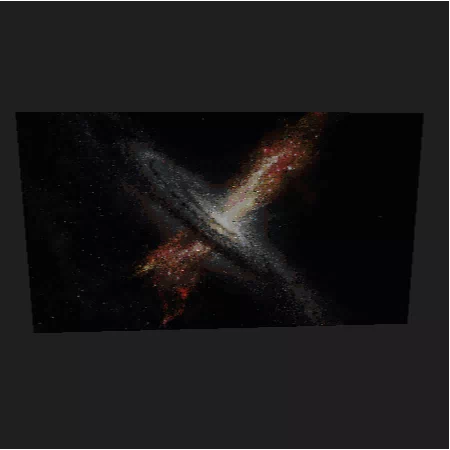
Description
reminder to not put this ingame unless you have a god pc
The model contains
acacia log: 576
acacia planks: 135
andesite: 53
bedrock: 632
birch log: 459
birch planks: 171
black concrete: 56997
black concrete powder: 6879
black glazed terracotta: 545
black terracotta: 1924
black wool: 4756
bone block: 360
bookshelf: 65
bricks: 158
brown concrete: 269
brown concrete powder: 238
brown glazed terracotta: 65
brown mushroom block: 32
brown terracotta: 936
brown wool: 171
chiseled quartz block: 81
chiseled sandstone: 32
clay: 101
coal block: 19850
coal ore: 272
cobblestone: 12
cracked stone bricks: 60
crafting table: 21
cut sandstone: 203
cyan terracotta: 544
dark oak log: 508
dark oak planks: 188
diamond ore: 42
diorite: 134
dirt: 123
end stone bricks: 21
gold ore: 135
granite: 75
gravel: 64
gray concrete: 3199
gray concrete powder: 670
gray glazed terracotta: 132
gray terracotta: 5501
gray wool: 1704
green wool: 1
iron block: 5
iron ore: 93
jungle log: 35
jungle planks: 157
lapis ore: 32
light blue terracotta: 10
light gray concrete: 48
light gray concrete powder: 323
light gray glazed terracotta: 10
light gray terracotta: 68
light gray wool: 137
magenta terracotta: 16
mossy cobblestone: 114
mossy stone bricks: 75
nether bricks: 1303
nether quartz ore: 191
nether wart block: 7
netherrack: 429
note block: 408
oak log: 39
oak planks: 38
obsidian: 3
orange concrete powder: 11
orange glazed terracotta: 20
orange terracotta: 8
orange wool: 6
packed ice: 2
pink concrete: 61
pink concrete powder: 32
pink glazed terracotta: 75
pink terracotta: 230
pink wool: 4
polished andesite: 65
polished diorite: 96
polished granite: 419
prismarine bricks: 1
purple terracotta: 78
purpur block: 5
purpur pillar: 7
quartz block: 146
red concrete: 61
red concrete powder: 51
red glazed terracotta: 80
red mushroom block: 13
red nether bricks: 3
red terracotta: 433
red wool: 11
redstone ore: 69
sand: 20
sandstone: 4
snow block: 99
soul sand: 657
sponge: 2
spruce log: 265
spruce planks: 17
stone: 53
stone bricks: 30
terracotta: 95
white concrete: 7
white concrete powder: 2
white glazed terracotta: 2
white terracotta: 569
white wool: 26
yellow glazed terracotta: 10
How do I move or rotate the model?
Use the editor window above to rotate or move the model as you want, and then click the Get the command button to get a new command.
If you want to make more changes or completely remake the model, open the full version of the editor using the Open in BDEngine button.
How to use it?
Via command blocks:
To use a command in the game, you need a Command Block, as the chat field in Minecraft has a character limit.
- 1. Open the chat on the "/" button and paste this command into it:
- 2. Place the Command Block in the desired location.
- 3. Right-click on the Command Block and specify in the Console Command field - this model's command, which you can copy by clicking on Get the command.
- 4. Change Need Redstone to Always Active.
- 5. Press Done.
Now you can destroy the Command Block and enjoy the installed model. Repeat the procedure several times if there are multiple model commands in the export window.
Via Axiom mod:
Be sure to install Axiom [modrinth] if you haven't already.
- 1. Click Get the command, select Command format: Axiom and copy the command.
- 2. Open the desired world in the game.
- 3. Use ctrl + V to insert a model into the world.
- 4. Click on the small white cube, next to the model, to move and rotate it.
Loading comments...